Turn résumé PDFs into your standard candidate form
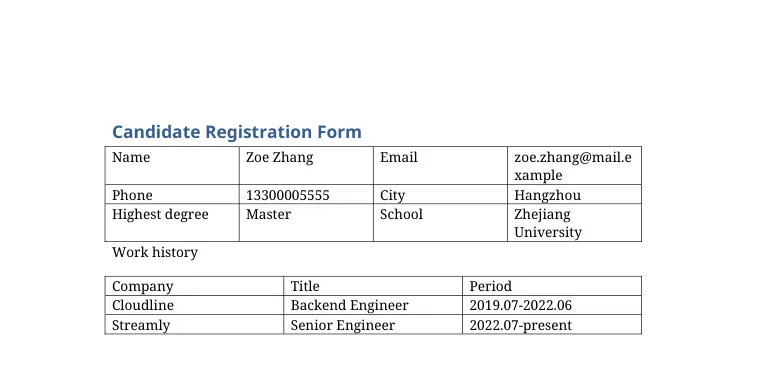
Every candidate formats their résumé differently, but your hiring team needs the same form every time. QuickBlank reads each résumé and fills your candidate registration template, including the work-history table.
See it on a sample
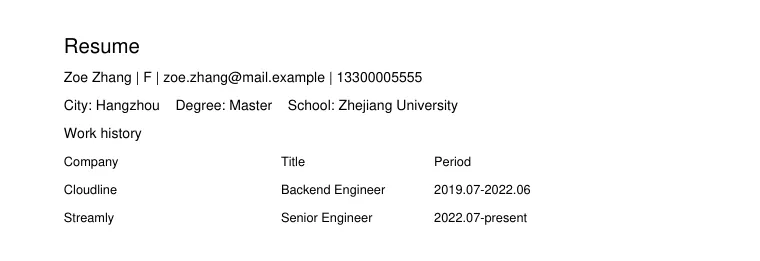
A made-up résumé, run through QuickBlank. Nothing on this page is customer data.
What was read, and from where
- NameZoe ZhangFrom the PDF, page 1: “Zoe Zhang”Filled
- Emailzoe.zhang@mail.exampleFrom the PDF, page 1: “zoe.zhang@mail.example”Filled
- Phone13300005555From the PDF, page 1: “13300005555”Filled
- CityHangzhouFrom the PDF, page 1: “City: Hangzhou”Filled
- Highest degreeMasterFrom the PDF, page 1: “Degree: Master”Filled
- SchoolZhejiang UniversityFrom the PDF, page 1: “School: Zhejiang University”Filled
Work history
| Company | Title | Period |
|---|---|---|
| Cloudline | Backend Engineer | 2019.07-2022.06 |
| Streamly | Senior Engineer | 2022.07-present |
Values are shown as they were read. A value the system is unsure about is marked, and a value that is not in the document stays empty. Check the result before you rely on it.
What you start with
- Résumés in any layout
- Multi-column and designed PDFs
- Scanned résumés
What gets filled in
- Name, email, phone and city
- Education and school
- Work history as a table
- Any extra fields you define
How it works
- 1
Add your candidate form
A Word document with fields and a work-history table works well.
- 2
Add the résumés
Process a whole stack at once; files that need attention are listed first.
- 3
Download the filled forms
Get Word files, PDFs, or a ZIP with consistent names for every candidate.
Why teams use it
Same format every time
Compare candidates on one standard form.
Safe against tricks
Instructions hidden inside a document are treated as data, never obeyed.
Batch friendly
Only documents with uncertain values need a closer look.
Frequently asked questions
Does it understand different section names?
Yes. Headings like Experience, Employment or Work history are matched by meaning, not by exact words.
What about missing information?
Anything not found stays empty and is clearly marked, so you can fill it in or leave it blank.
Can I process many résumés together?
Yes, many files per batch (up to 50, depending on the plan), then download everything as one ZIP.
Try it with your own résumé template
New accounts get 20 free credits, enough for about one template and a dozen one-page files. No card needed.
Files are stored privately and are reachable only through short-lived links. Uploaded PDFs and generated documents are deleted automatically after 30 days, and you can delete them yourself at any time. Privacy policy. Questions: support@quickblank.com.