Fill Word forms and applications from PDF documents
Onboarding sheets, visa applications, registrations: the information already exists in PDFs. QuickBlank reads them and fills your Word form, including fields in headers, footers and merged table cells.
See it on a sample
A made-up application form, run through QuickBlank. Nothing on this page is customer data.

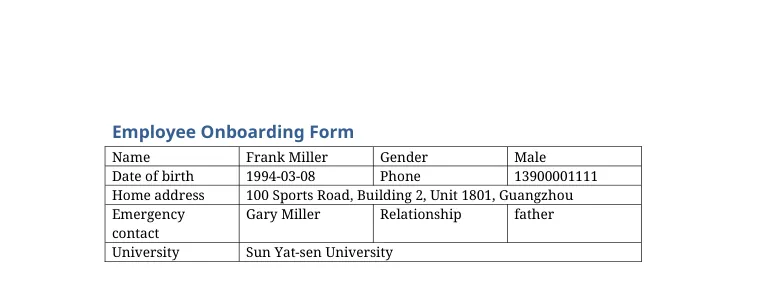
What was read, and from where
- NameFrank MillerFrom the PDF, page 1: “Name: Frank Miller”Filled
- GenderMaleFrom the PDF, page 1: “Gender: Male”Filled
- Date of birth1994-03-08From the PDF, page 1: “Date of birth: 1994-03-08”Filled
- Phone13900001111From the PDF, page 1: “Mobile: 13900001111”13700002222 is emergency contact's phoneCheck this one
- Home address100 Sports Road, Building 2, Unit 1801, GuangzhouFrom the PDF, page 1: “100 Sports Road, Building 2, Unit 1801, Guangzhou”Filled
- Emergency contactGary MillerFrom the PDF, page 1: “Emergency contact: Gary Miller (father)”Filled
- RelationshipfatherFrom the PDF, page 1: “Gary Miller (father)”Filled
- UniversitySun Yat-sen UniversityFrom the PDF, page 1: “University: Sun Yat-sen University”Filled
Values are shown as they were read. A value the system is unsure about is marked, and a value that is not in the document stays empty. Check the result before you rely on it.
What you start with
- ID and passport data pages
- Certificates and statements
- Earlier forms from other systems
What gets filled in
- Personal and company details
- Fields in headers and footers
- Table cells, including merged cells
- Inline blanks such as ______ or [ ]
How it works
- 1
Add the form
Underscores, brackets and empty cells are all recognised.
- 2
Add what you have
Names that differ between documents, such as Surname, Given name or Full name, are understood.
- 3
Check and download
Fields that could not be found are listed as empty instead of being invented.
Why teams use it
Works with real-world templates
Merged cells, repeated rows, headers and footers.
Nothing is guessed
Missing information stays blank and is highlighted.
Learns from you
Corrections you make teach the template for next time.
Frequently asked questions
Does it support text boxes?
Not yet. Content inside Word text boxes cannot be filled automatically; the review page tells you if something may be missing.
Can I add a field it missed?
Yes. Open the template preview and click the blank you want to add.
Can several documents feed one form?
Each PDF fills one copy of the form. Process a batch to get one filled form per document.
Try it with your own application form template
New accounts get 20 free credits, enough for about one template and a dozen one-page files. No card needed.
Files are stored privately and are reachable only through short-lived links. Uploaded PDFs and generated documents are deleted automatically after 30 days, and you can delete them yourself at any time. Privacy policy. Questions: support@quickblank.com.