Pull key contract terms into your Word template
Keep a consistent contract register without reading every page twice. QuickBlank finds the parties, dates, amounts and terms you care about and fills them into your summary template, showing exactly where each one came from.
See it on a sample
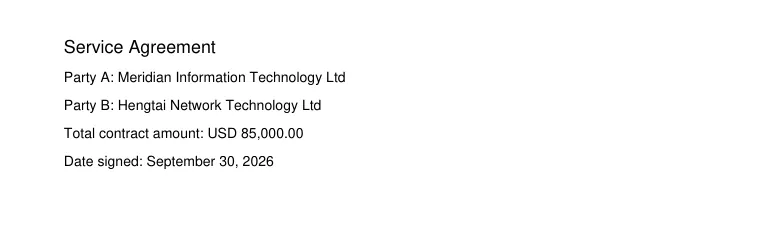
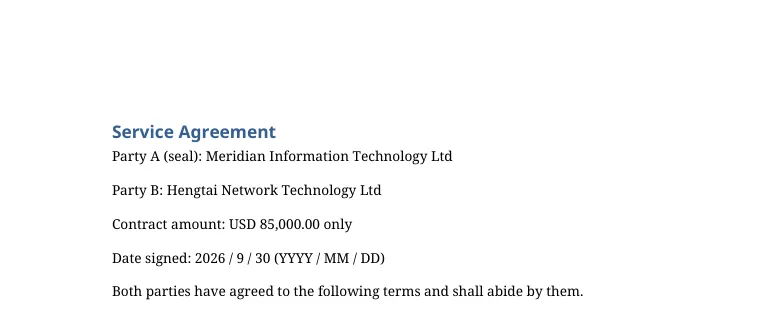
A made-up contract, run through QuickBlank. Nothing on this page is customer data.
What was read, and from where
- Party A (seal)Meridian Information Technology LtdFrom the PDF, page 1: “Party A: Meridian Information Technology Ltd”Filled
- Party BHengtai Network Technology LtdFrom the PDF, page 1: “Party B: Hengtai Network Technology Ltd”Filled
- Contract amountUSD 85,000.00From the PDF, page 1: “Total contract amount: USD 85,000.00”Filled
- Date signed - year2026From the PDF, page 1: “Date signed: September 30, 2026”Filled
- Date signed - month9From the PDF, page 1: “Date signed: September 30, 2026”Filled
- Date signed - day30From the PDF, page 1: “Date signed: September 30, 2026”Filled
Values are shown as they were read. A value the system is unsure about is marked, and a value that is not in the document stays empty. Check the result before you rely on it.
What you start with
- Signed contracts and agreements
- Long, multi-page PDFs where values are buried
- Amounts written in words and numbers
What gets filled in
- Party names and roles
- Effective, signing and end dates
- Contract value and payment terms
- Any custom fields you add
How it works
- 1
Add your summary template
Use the Word form you already keep contracts in. Blanks like [____] or empty cells are recognised.
- 2
Add the contracts
One or many PDFs. Different wording for the same thing, such as client or customer, is matched by meaning.
- 3
Check against the source
Open a file and click any field to jump to the highlighted text in the PDF. Uncertain values are flagged for you.
Why teams use it
Fast reviews
See the key terms side by side with the original.
Fewer mistakes
Conflicting values are listed as alternatives for you to choose.
Privacy-minded
Files are private, links expire, and everything is deleted automatically after the retention period.
Frequently asked questions
What if the amount appears several times in the contract?
The most likely value is filled in and the others are offered as alternatives, each with its source text, so you can pick the right one.
Can it fill dates written across several blanks?
Yes. A date split into day, month and year blanks is filled correctly.
Does it replace legal review?
No. It speeds up data entry and checking; a person confirms every value before the document is generated.
Try it with your own contract template
New accounts get 20 free credits, enough for about one template and a dozen one-page files. No card needed.
Files are stored privately and are reachable only through short-lived links. Uploaded PDFs and generated documents are deleted automatically after 30 days, and you can delete them yourself at any time. Privacy policy. Questions: support@quickblank.com.