Fill your expense claim form from receipts and tickets
Stop typing receipts into the expense form. QuickBlank reads the receipts, tickets and invoices and fills your Word claim, adding one table row per expense.
See it on a sample
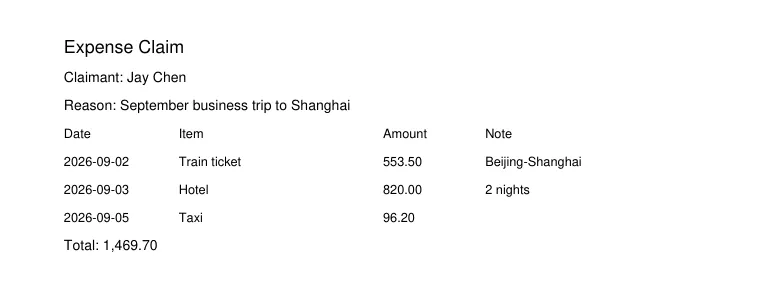
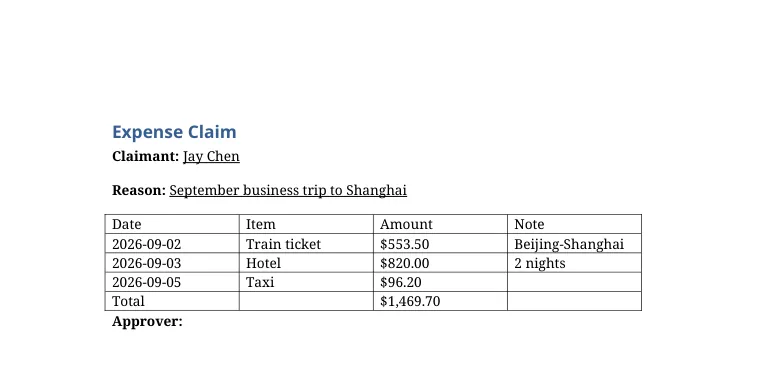
A made-up expense claim, run through QuickBlank. Nothing on this page is customer data.
What was read, and from where
- ClaimantJay ChenFrom the PDF, page 1: “Claimant: Jay Chen”Filled
- ReasonSeptember business trip to ShanghaiFrom the PDF, page 1: “Reason: September business trip to Shanghai”Filled
- Approver(nothing)Left empty: not in the document
- Total1,469.70From the PDF, page 1: “Total: 1,469.70”Filled
Expenses
| Date | Item | Amount | Note |
|---|---|---|---|
| 2026-09-02 | Train ticket | 553.50 | Beijing-Shanghai |
| 2026-09-03 | Hotel | 820.00 | 2 nights |
| 2026-09-05 | Taxi | 96.20 |
Values are shown as they were read. A value the system is unsure about is marked, and a value that is not in the document stays empty. Check the result before you rely on it.
What you start with
- Receipts and e-tickets
- Hotel and travel invoices
- Scanned or photographed PDFs
What gets filled in
- Claimant and reason for the claim
- One row per expense: date, item, amount, note
- Approver and totals if present
How it works
- 1
Add your claim form
Your table can have several blank rows; the extra blanks are tidied away automatically.
- 2
Add the documents
One PDF with several receipts, or one file per receipt.
- 3
Check and download
Check the rows against the source, then download the filled claim.
Why teams use it
Rows that fit
The table grows or shrinks to the number of expenses.
No invented totals
A total is only filled in if it is printed on the document.
Export anywhere
Word for editing, PDF for sending.
Frequently asked questions
Will blank rows in my template stay empty?
No. Spare blank rows are removed and the table is generated from the real number of expenses.
Can I add my own columns?
Your template decides the columns. We detect them from the header row and fill each one.
Are amounts formatted for me?
Yes. Amounts, dates and numbers are formatted consistently using the format of your template.
Try it with your own expense claim template
New accounts get 20 free credits, enough for about one template and a dozen one-page files. No card needed.
Files are stored privately and are reachable only through short-lived links. Uploaded PDFs and generated documents are deleted automatically after 30 days, and you can delete them yourself at any time. Privacy policy. Questions: support@quickblank.com.